
The standard TikTok video size is 1080 x 1920 pixels at a 9:16 aspect ratio. That's a full-screen vertical video, and it's the shape the For You feed is built around.
TikTok accepts more than that. When you upload from a computer, TikTok Studio takes files up to 30 GB and up to 60 minutes long, recommends MP4, suggests 1080p, 1440p or 4K for high resolution, and recommends 9:16 for vertical video and 16:9 for landscape. Photo posts can hold up to 35 images.
This guide covers the full spec sheet, the parts of the screen TikTok's buttons cover, the file settings that survive compression, and how to fix horizontal or square footage before you post.
TikTok video size cheat sheet
| Spec | Recommendation | Why it matters |
|---|---|---|
| Dimensions | 1080 x 1920 px | Fills the screen with no bars |
| Aspect ratio | 9:16 (16:9 accepted for landscape) | Vertical video gets the full phone screen |
| Resolution | 1080p or higher | TikTok Studio recommends 1080p, 1440p or 4K |
| File format | MP4 | TikTok's recommended format; MOV and WebM also work |
| Video codec | H.264 | Most compatible; H.265 also accepted |
| Frame rate | 30 FPS | TikTok's API accepts 23 to 60 FPS |
| Max file size | 30 GB (desktop upload) | Scheduling tools using TikTok's API are capped at 4 GB |
| Max length | 60 minutes (desktop upload) | Via the API: 3 minutes for everyone, 5 or 10 for some accounts |
| Photo posts | Up to 35 photos | JPG, PNG or WebP, up to 50 MB each on desktop |
Why 9:16 is the default on TikTok
TikTok is watched on phones held upright, one video at a time, full screen. A 9:16 video matches that screen exactly. Nothing else is competing for attention, and your video gets every pixel.
The cost of using the wrong ratio
Upload a 16:9 clip and it plays as a strip across the middle of the screen, surrounded by empty space. A square clip leaves big gaps above and below. Viewers notice in the first half-second that the video wasn't made for TikTok, and the easiest response is to swipe.
That doesn't mean landscape is banned. TikTok Studio explicitly lists 16:9 as a recommended ratio for landscape video, and some content, like gaming or wide demos, makes sense that way. But for talking-head clips, tutorials, slideshows and anything made for the For You feed, vertical is the safer bet.
Keeping content inside TikTok's safe zones
TikTok overlays its interface on top of every video. If your text or logo sits in the wrong place, the app covers it.
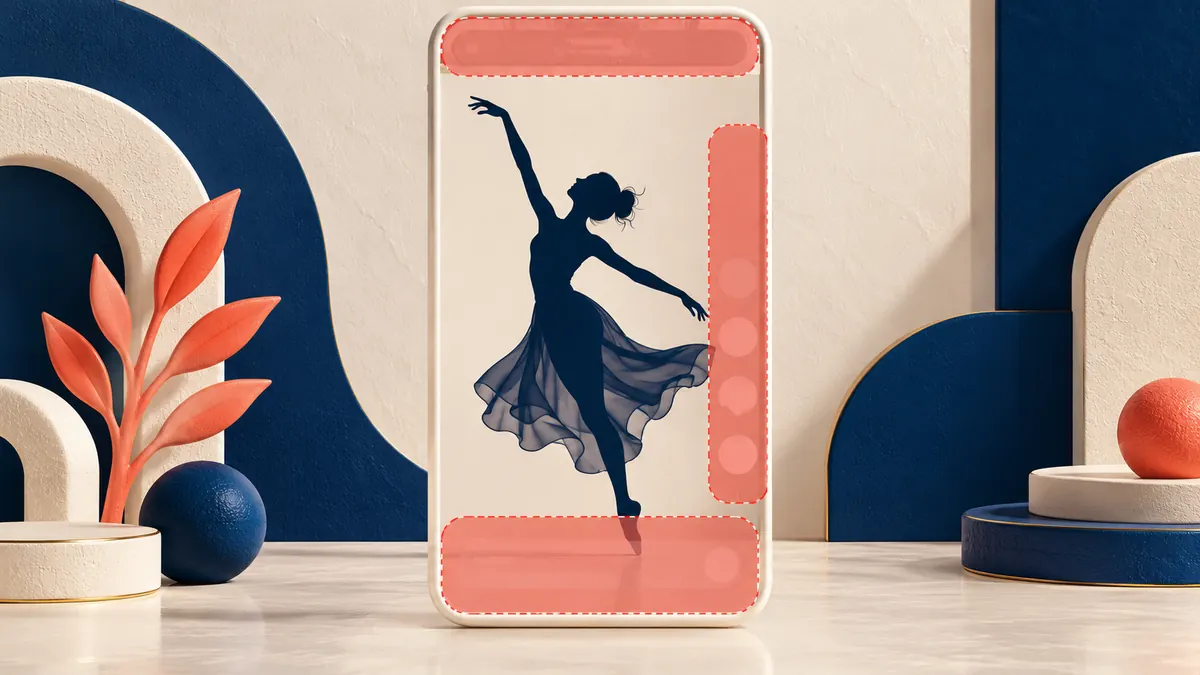
What covers your video
- Top: the Following and For You tabs, plus search and other shortcuts.
- Right side: your profile picture, like, comment, save and share buttons, and the spinning sound icon.
- Bottom: your username, caption, sound name, any link or product tags, and the app's navigation bar.
Practical margins
TikTok's layout shifts with device size, app version and features like captions or shopping links, so there's no single official pixel map for regular posts. A rule of thumb that holds up well on a 1080 x 1920 frame:
- Keep text out of the top 10% (about 190 px).
- Keep text out of the bottom 25% (about 480 px), more if you write long captions.
- Keep text out of the right 12% (about 130 px), where the buttons sit.
- Leave a small margin on the left (about 60 px) so nothing touches the edge.
Then check the preview in TikTok's editor before you post. If on-screen text runs under the caption or the buttons, move it toward the center.
File settings for a clean upload
TikTok re-encodes every video. Give it a clean, high-quality file and less detail gets lost.
File format and codec
Export as MP4 with H.264 video and AAC audio. TikTok recommends MP4, and H.264 plays nicely with every editor and phone. TikTok's developer documentation also lists MOV and WebM files and H.265, VP8 and VP9 codecs as supported, but you rarely need them.
File size limits by upload method
- TikTok Studio on desktop: up to 30 GB and 60 minutes per video.
- Scheduling tools and apps using TikTok's API: up to 4 GB. TikTok's developer docs say every creator can post 3-minute videos this way, and some accounts have access to 5 or 10 minutes.
- The TikTok app: TikTok doesn't publish a separate file size cap for phone uploads. Long, high-bitrate files upload faster from a computer.
Frame rate and resolution
Export at the frame rate you shot at, usually 30 FPS. TikTok's API accepts 23 to 60 FPS. Video dimensions can run from 360 to 4096 pixels per side, but 1080 x 1920 is the sweet spot between sharpness and file size. If you film in 4K, uploading the 4K file is fine, as long as your connection can handle it.
Common TikTok formatting mistakes
Mistake 1: Uploading horizontal or square video as-is
A video exported for YouTube or Instagram's old square feed looks small and boxed-in on TikTok. Reframe it to 9:16 before you upload.
Mistake 2: Ignoring the safe zones
Subtitles burned into the bottom of the frame often end up under the caption. Headlines placed at the very top can collide with the For You tab. Keep both in the middle band of the screen.
Mistake 3: Re-uploading a compressed copy
Downloading your own video from another app and uploading that copy means compressing it twice. It may also carry another platform's watermark. Always upload from your original export.
How to repurpose content for TikTok
Reformatting horizontal video for a vertical screen
You have three good options, all available in most editors, including CapCut, Premiere Pro, DaVinci Resolve and Final Cut Pro:
- Crop and reframe. Set the project to 1080 x 1920 and move the frame to follow the speaker or action. Works best when there's one clear subject.
- Stack it. Place the landscape clip in the middle, a bold headline above and subtitles below. Good for screen recordings and podcasts.
- Use a blurred background. Put the landscape clip in the center over a blurred, enlarged copy of itself. A fast fix, but it looks like a fix, so use it sparingly.
Photo posts and slideshows
TikTok photo posts take up to 35 images. When you upload from desktop, TikTok Studio accepts JPG, JPEG, PNG and WebP files up to 50 MB each and recommends 16:9, 4:3 or 3:4. In the app, many slideshow creators design at 1080 x 1920 so each slide fills the screen. Our free TikTok photo resizer gets your images to TikTok's sizes before you upload.
Schedule TikTok videos and slideshows with ViralFarm
ViralFarm schedules TikTok videos and photo slideshows from a queue and calendar, alongside Instagram Reels, YouTube Shorts and five other networks. If you prefer to add a trending sound or final touches in the TikTok app, use the send-to-drafts mode, which delivers the post to your TikTok drafts instead of publishing it.
ViralFarm can also generate TikTok slideshows from a link, a topic or pasted text, using templates modeled on posts that went viral. The free plan covers 2 channels and 20 published posts a month, and you don't need a credit card.
Frequently asked questions
What happens if I upload a square video to TikTok?
It plays at full width with empty space above and below, so it fills only about half of a typical phone screen. It works, but it looks less native than a 9:16 video. Reframe it to 1080 x 1920 if you can.
Can you upload 4K video to TikTok?
Yes. TikTok Studio lists 4K among its recommended high resolutions. Viewers' phones and connections decide what quality they actually see, so 1080 x 1920 is enough for most creators and uploads faster.
How do I check my video's aspect ratio?
Look at the pixel dimensions in your editor's export settings or your phone's file info. Divide the width by the height: 1080 divided by 1920 is 0.5625, which is 9:16. If you get 1.78, the video is 16:9 landscape.
What size should TikTok slideshow photos be?
For full-screen slides in the app, 1080 x 1920 (9:16) works well. When uploading from desktop, TikTok Studio recommends 16:9, 4:3 or 3:4, with up to 35 photos per post and up to 50 MB per photo.
How long can a TikTok video be?
Up to 60 minutes when you upload through TikTok Studio on desktop. Tools that post through TikTok's API are limited to 3 minutes for all creators, with 5 or 10 minutes available to some accounts.
Why does my TikTok look blurry after posting?
The usual causes are a low-resolution source file, a video that was already compressed by another app, or a weak connection during upload. Export at 1080 x 1920 or higher, upload the original file, and use Wi-Fi.
Set up a 1080 x 1920 export preset once and every TikTok you make will fit the screen. When you're ready to plan the posting schedule, Start free — no credit card required.